Drafting
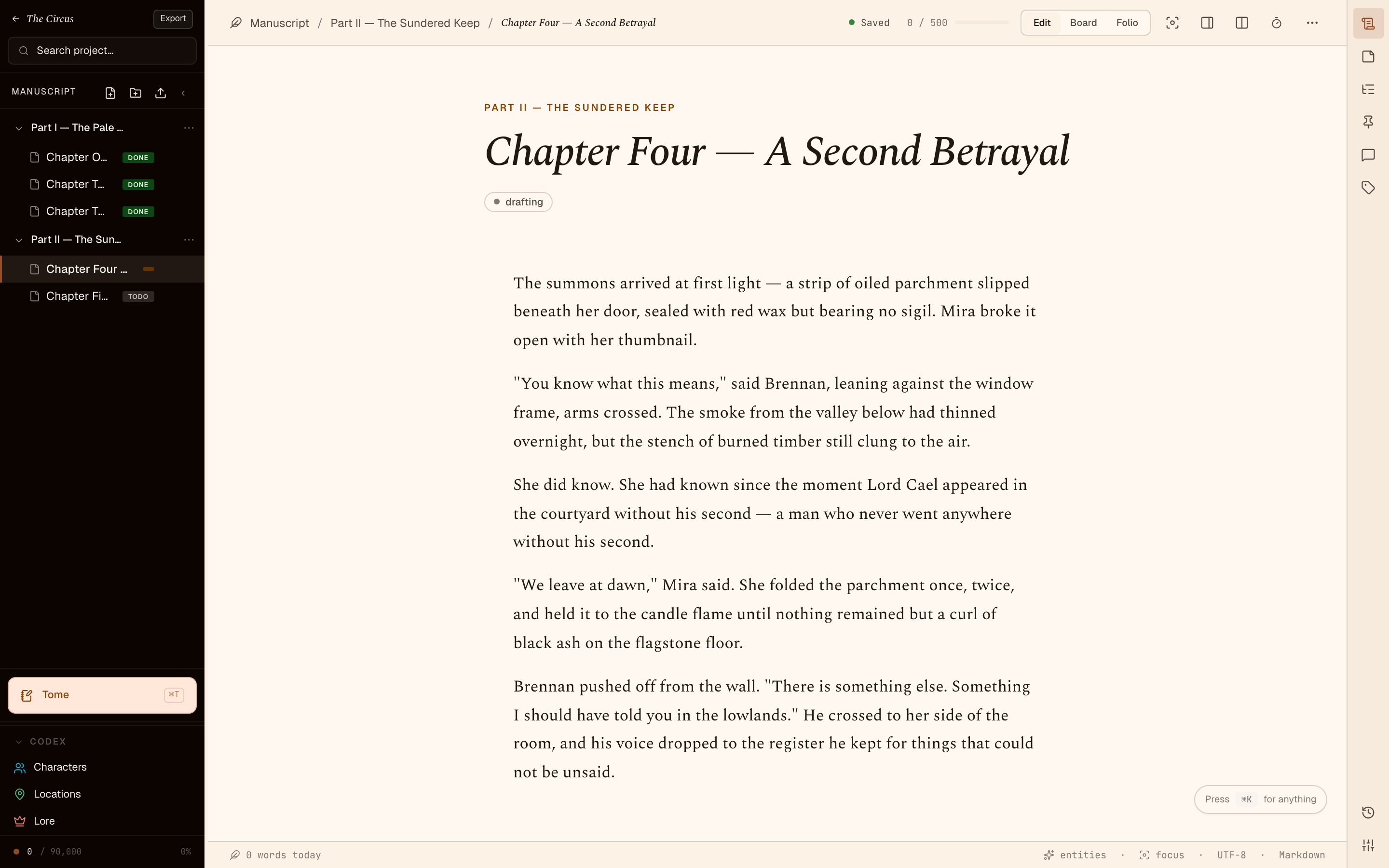
Drafting is the bulk of the work. Trove tries to stay out of the way: the editor is the centre of the screen, the chrome dims when you don’t need it, and the file you’re writing is the same file on disk that it’d be in any other editor.
Open a Document and write
Section titled “Open a Document and write”Click a Document in the Manuscript binder. The editor takes the centre column. Type. Saves are automatic.
The editor is Tiptap on top of ProseMirror, persisting as Markdown. You get inline shortcuts:
#,##,###for headings-and1.for lists>for blockquotes**bold**,*italic*,`code`---for a horizontal rule
Footnotes, images, links, and tables all map to standard CommonMark.
Sprints
Section titled “Sprints”A Sprint is a timed writing session with a word goal. Start one from the side rail (the timer icon) or from the command palette (⌘K → sprint).
Pick:
- Duration — 10, 15, 25 minutes; or custom.
- Goal — words to add. Defaults to a sensible Pomodoro-ish 300 words for 25 minutes.
Trove records your starting word count, runs the timer, and shows the delta. When the timer ends you get a Toast — keep writing or stop. Either way the Sprint is logged.
Sessions and goals
Section titled “Sessions and goals”A Session is the broader writing-time tracker. Every Sprint, plus any free writing you do, rolls up into:
- Daily totals — words written today.
- Weekly totals — last 7 days.
- Streaks — consecutive days hit your goal.
- Achievements — unlocked at milestones (first 1k words in a day, 30-day streak, 50k words on a Project).
Set a daily word goal in Settings → Stats. The dashboard widget shows your progress.
Focus mode
Section titled “Focus mode”The editor has a focus mode (toolbar → focus icon, or ⌘.) that:
- Dims the binder and right rail.
- Centres the prose to a comfortable measure (
--width-prose: 680px). - Pads vertically so the current paragraph stays near the middle of the viewport.
Good for getting out of your own way.
Inline references and Entities
Section titled “Inline references and Entities”Type [[ to insert an Entity reference. Trove pops up an autocomplete of Characters, Locations, and other Entities from the Project and any linked World. Pick one — Trove renders the name and the reference is tracked.
References light up the Entity sidebar — open a Character and you’ll see every Document that mentions her, with the surrounding sentence as context.
Sticky Notes and Comments
Section titled “Sticky Notes and Comments”Two ways to leave reminders inside a Document:
- Sticky Notes — small typed, coloured notes pinned to the side of the Document. Live in a
.sticky.jsonsidecar; do not appear in the prose. Good for “fix this transition”, “check the character name”, or a colour-coded TODO. - Comments — inline annotations on a text range. The text stays put; the comment shows in the gutter. Good for revision passes where you want the prose intact.
Saves and conflicts
Section titled “Saves and conflicts”Trove writes to disk on debounce — typically within a second of you pausing. Each Document saves to its own .md file, atomically (write to temp, rename).
If you edit the same Document outside Trove (in another Markdown editor, for example) while it’s open in Trove, Trove will notice the file changed and prompt you before overwriting. The desktop app is single-writer per file by design — keep one editor authoritative at a time.
Auto-save and crash safety
Section titled “Auto-save and crash safety”The desktop app is crash-safe. If Trove dies mid-edit, the worst case is you lose whatever was in the input buffer since the last debounced save (usually under a second). No corrupted files; no half-written .md. The atomic-write pattern guarantees that any .md on disk is either the previous good version or the new good version.